Saturday, October 25, 2008

computer pranks

1. Fake computer virus error message

This one is by far, the easiest and all you have to do is to make a new text document with notepad, type msg * YOUR MESSAGE and save as anything.bat. As always, make sure that you select All files instead of Text Document.
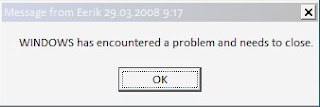
2. Forced shutdown trojan.
This will display a custom error message and start a countdown which will shut down the computer.

Right-click your desktop and create a new shortcut.
Paste the following code into the Location box in the Create Shortcut
menu:
shutdown -s -t 30 -c “Your message here”
Replace 30 with the length of the countdown you want (in seconds) and place your custom error message between the quotes. Click next and name the shortcut to something the victim would be likely to click on such as “Internet explorer” or “My Documents”, etc.

Next you’d want to change the icon. Right-click on the shortcut you made and click properties. Find the Change Icon button and click it. Choose a suitable icon for the name you chose earlier.


And that’s all! Now you just have to sneak the shortcut onto the victim’s desktop and run!

Note: to stop it, open Run from the start menu and type shutdown-a.


3. Endless Command prompt windows trojan
This will open up a series of command prompt windows that will never end.
The basic idea is that there are two .bat files that open the
other one when opened, so the other one opens the first one again and the windows just won’t stop coming.

How to do this:
1. Fire up notepad and type: start 2.bat
2. Save it as 1.bat (make sure you choose all files when saving it)
3. Make another new text document and type: start 1.bat
4. Save it as 2.bat into the same folder as the other one.

All you have to do to start it is to click on either of them.

The on
ly way to stop it is to wait for the windows to become so numerous that they are a group on the taskbar. Then you can use Close group to get rid of the bastards.

4. Fake Command prompt trojan viruses
This is also a good way to make the victim believe that a worm is gnawing at their hard drive and that they can’t do anything to stop it.

Open up notepad and type @echo off

  • To make text appear, type it after an echo tag.
  • To have the the commands wait for the user to press any key type pause

(Note: if you write pause >nul it won’t display Press Any key to continue…)

  • To have a complete high-speed description of files in the drive of the .bat file, type dir /s
  • You can also initiate any other command we covered earlier, such as shutdown, error message, etc.

And why no include all of these in one fake virus?

For example:

I can’t post the batch files here, as sharing .bat files over the internet is illegal.
Make sure you don’t do anything stupid with these tips.

ShareThis

Add item to right click

Add item to right click

When you right click on any folder, you can have access to that application, the same as using
Sent To and New. Open Registry Editor. Navigate and choose:
HKEY_CLASSES_ROOT\Folder\shell. Add a new Key to the “Shell” Key and name
it anything you like. Give it a default value that will appear when you right click a
folder, i.e. NewKey [...]

PROCEDURE FOR REMOVING A VIRUS

PROCEDURE FOR REMOVING A VIRUS

We generally experience the following in our system if our sys gets affected by this Virus…

1)In IE title bar is changed to Hacked By Godzilla

2)Double clicking on drive shows open with options.

Here is the procedure to remove virus “hacked by Godzilla”
We’ll go step by step ….
1. Double Click on My Computer icon on Desktop and select Tools –> Folder Options

2. In Folder Options click at View tab1. check at Show Hidden files and folders

3. uncheck the Hide extention… and Hide protected operating system file

4. click OK
Since this will make visible all the DLL files of our system…I request my frnds Be cautious with the procedure..when we try to delete the virus…because we work with our operating System files tooo….

5.Press Ctrl+Alt+Delete. The Windows Task Manager will dispalay. Click at Processes tab
Now you can see many Processes running….In that Virus also makes its process run..we can see wscript.exe processes running..actually these are the Virus causing processes….

6. Select wscript.exe (one by one)

7. Click End Process button

8.Open drive (By right click and select Explore. Must not Double Click !) Delete autorun.inf and MS32DLL.dll.vbs (Press Shift+Delete) in all drives include Pen Drive and Floppy disk.(i.e; any R/W compatible memory devices….)

Remember, do not double click on drive just explore it and delete the virus.

hack a mobile phone address book

You can replace or modify the victim mobile phone’s address book by using the following steps:- (a) Create a new address book entry. Try to keep the list of contact names same as in victim’s address book. If you have no idea about victim mobile phone’s address book then try some common words like Work or Office or Mobile or Home etc…(Whatever in your mind….) (b) Sent this newly created address book to the victim mobile phone via Blue tooth. (c) As soon as the victim accepts the blue tooth message, it shall replace the existing entry with the new information. This is also know as “Blue Jacking” or simply a “Blue Jack Attack”

firefox tweaks

Yes, firefox is already pretty damn fast but did you know that you can tweak it and improve the speed even more? Well that’s the beauty of this program being open source. Here’s what you do:

In the URL bar, type “about:config” and press enter. This will bring up the configuration “menu” where you can change the parameters of Firefox. Note that these are what I’ve found to REALLY speed up my Firefox significantly - and these settings seem to be common among everybody else as well. But these settings are optimized for broadband connections.

ok now Double Click on the following settins and put in the numbers below - for the true / false booleans - they’ll change when you double click.

Code:
browser.tabs.showSingleWindowModePrefs – true
network.http.max-connections – 48
network.http.max-connections-per-server – 16
network.http.max-persistent-connections-per-proxy – 8
network.http.max-persistent-connections-per-server – 4
network.http.pipelining – true
network.http.pipelining.maxrequests – 100
network.http.proxy.pipelining – true
network.http.request.timeout – 300

One more thing… Right-click somewhere on that screen and add a NEW -> Integer. Name it “nglayout.initialpaint.delay” and set its value to “0”. This value is the amount of time the browser waits before it acts on information it receives. Since you’re broadband - it shouldn’t have to wait.

Now you should notice you’re loading pages MUCH faster now!